
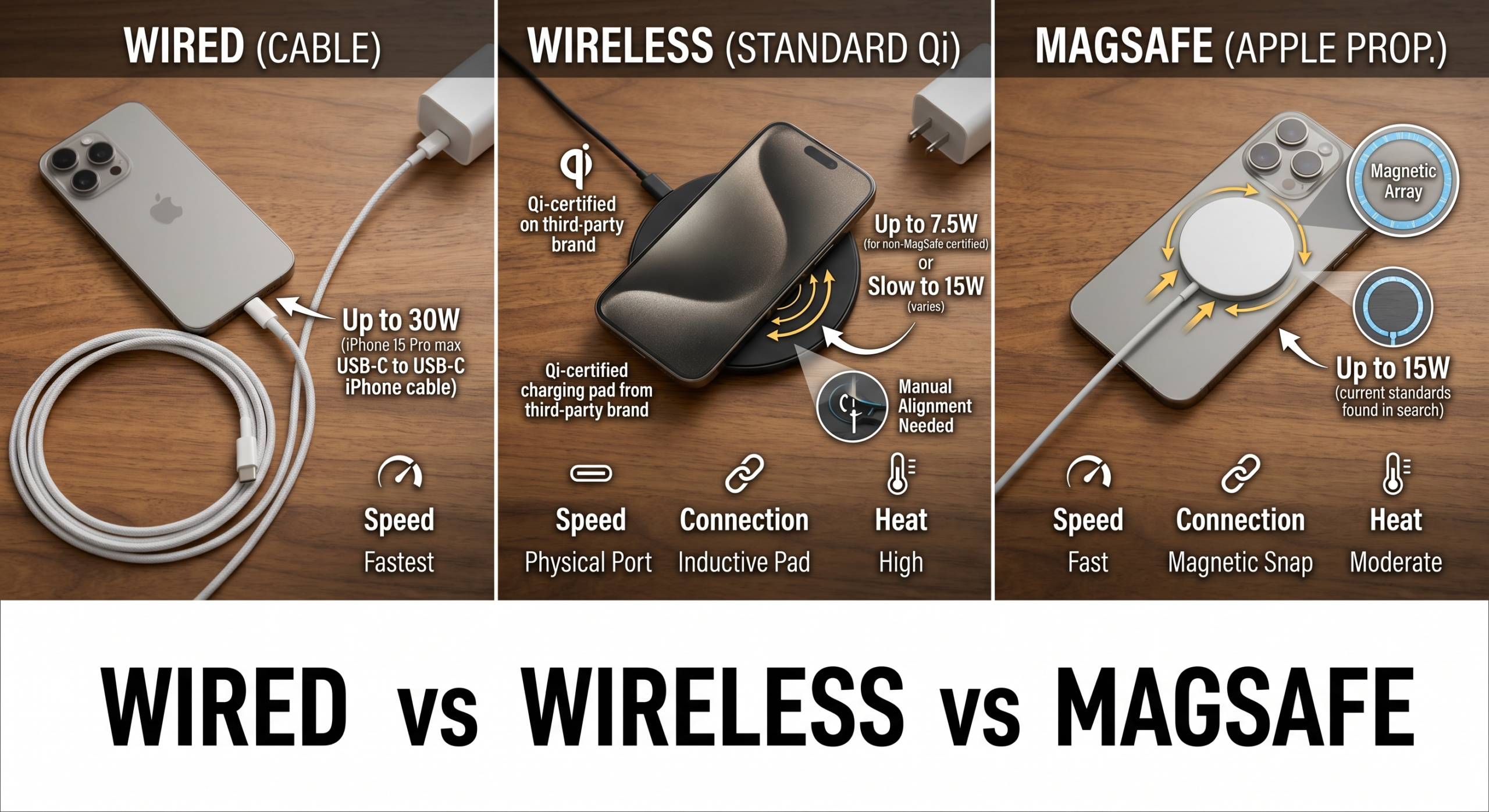
Direct Answer: Heat is what damages iPhone batteries, not charging method. Wired charging through a quality cable generates the least heat, standard Qi wireless generates the most, and MagSafe sits in between with Apple’s thermal management. The lifetime difference between methods is small for normal use. The bigger battery-health levers are: avoid heat during charging, enable Optimised Battery Charging, use a quality cable, and don’t routinely leave the phone at 100% for long stretches. Charge however suits your life.
Key Takeaways
- The internet’s “wireless charging is bad for batteries” claim is mostly a myth — heat is the actual culprit, and the heat difference between methods is smaller than people assume.
- Wired with a quality cable is technically best for battery health. MagSafe is second. Standard Qi wireless is third. The gap between them is real but small.
- What matters more than the method: avoid charging in hot environments, use Optimised Battery Charging, and pay attention to how warm your phone feels.
Wired vs Wireless vs MagSafe
This is one of the most common questions we get asked at the repair bench: should I avoid wireless charging because it’ll wreck my battery? The internet has been arguing about it for years, and the honest answer is more nuanced than either side claims. Wireless charging isn’t great for batteries. Wired isn’t a magic bullet either. The differences exist but they’re smaller than the noise around them.
Here’s an evidence-based answer from someone who replaces iPhone batteries every week and sees the actual long-term wear patterns.
The science: what actually damages a lithium-ion battery
iPhone batteries are lithium-ion. They lose capacity over time through three main mechanisms:
- Heat. Sustained temperatures above about 35°C accelerate the chemical reactions that degrade the battery’s internal structure. This is the single biggest factor in real-world battery wear.
- Time at high state of charge. Batteries kept at 100% degrade faster than batteries kept at 50%. The chemistry doesn’t like sitting fully charged.
- Charge cycle count. One full cycle = 100% of capacity charged through (could be one full charge or two half-charges). Apple rates iPhones for around 80% capacity remaining at 1,000 cycles for most current models, 500 cycles on older ones.
Heat is the variable that charging method affects. Cycle count is determined by how much you use the phone, not how you charge it. State of charge is something you control through habits and settings.
Heat generated by each charging method
This is where the differences live. Approximate heat output during typical charging, measured in real-world conditions:
| Method | Charging speed | Heat generation (relative) | Notes |
|---|---|---|---|
| Slow wired (5W charger) | Slow (5W) | Lowest | Best for battery, worst for convenience |
| Standard wired (20W USB-C) | Fast (20W) | Low | The default for current iPhones; well-balanced |
| Fast wired (27W+) | Very fast (27W+) | Moderate | iOS throttles if phone gets too warm |
| MagSafe (15W) | Moderate (15W) | Moderate | Magnetic alignment is efficient; thermal management built in |
| Standard Qi wireless (7.5W) | Slow (7.5W) | Higher than MagSafe | Less efficient alignment; heat varies by pad quality |
| Cheap third-party wireless | Slow (5-10W) | Highest | Poorly designed pads waste energy as heat |
The MagSafe number is interesting. Apple specifies MagSafe at 15W, which is faster than standard Qi (7.5W on iPhone), but the magnetic alignment makes it considerably more efficient. The result: MagSafe runs warmer than wired but cooler than poorly-aligned Qi.
What this means for your battery in real terms
If you charged exclusively wired for 3 years versus exclusively standard-Qi wireless for 3 years, the wireless-charged phone would likely show 2-5% lower battery health at the end. Real, measurable, but small. The phone would still be perfectly usable; the battery would still pass the 80% health threshold most users care about.
For comparison: charging in direct sunlight or in a hot car for 3 years could cost you 10-20% extra battery health degradation, regardless of whether you’re using wired, MagSafe, or Qi. Heat from the environment dwarfs heat from the charging method.
The practical takeaway: charging method matters far less than where and how you charge.
The MagSafe rescue role for iPhone 17
One specific exception worth mentioning: the iPhone 17 family has a known firmware issue where phones that hit 0% sometimes can’t wake up over wired charging. The fix is MagSafe. We’ve covered this in detail in our iPhone 17 dead battery post, but the relevance here is: if you have an iPhone 17, owning a MagSafe charger as backup is genuinely useful, regardless of any battery-health considerations.
Optimised Battery Charging — the feature you should turn on
Apple’s Optimised Battery Charging feature is the highest-leverage thing you can do for battery longevity. It learns your charging routine and slows the charge from 80% to 100% to arrive at full just before you typically unplug.
The reason this matters: lithium-ion batteries degrade fastest at high state of charge. A phone that sits at 100% for 8 hours every night ages faster than one that sits at 80% for 7 hours and then climbs to 100% in the final hour.
To enable: Settings → Battery → Battery Health & Charging → toggle Optimised Battery Charging on. It works with wired, MagSafe, and Qi.
Honest recommendations for everyday use
- Use wired charging when convenient. Generates the least heat. Use a decent cable and appropriate adapter (see our cables guide).
- Use MagSafe or Qi when it’s the right tool for the job. Bedside, desk, car. Don’t avoid wireless charging on battery-health grounds.
- Keep your phone cool while charging. Hard surface, not buried under bedding. Out of direct sunlight. Out of a hot car.
- Take a thick case off if your phone runs warm during wireless charging. Cases trap heat against the phone.
- Enable Optimised Battery Charging. No downsides for typical users.
- Don’t aim for 80% as some kind of magic threshold. The “stay between 20% and 80%” advice is for people obsessed with maximising battery health. For everyone else, it’s overcautious — modern iPhones manage charging well enough that the gain isn’t worth the inconvenience.
- Replace the battery when it drops below 80% capacity if you keep the phone for several years. A new battery costs from £35 and can make a 3-year-old iPhone feel new again.
Common myths busted
“Wireless charging is bad for batteries.” Mostly false. Wireless generates more heat, but the lifetime difference is small. The myth gained traction because early Qi wireless chargers were genuinely poor (lots of heat, slow charging). Modern MagSafe and Qi pads from reputable brands are much better.
“You should never let your battery hit 0%.” True for older iPhones (5-12), where deep discharge could occasionally fail to recover. Less critical for iPhone 13+ thanks to better battery management, except for the iPhone 17 firmware issue we mentioned. As a habit it’s still better to charge above 10-20%, but occasional 0% won’t kill the battery.
“Charging overnight is bad.” Less true now than it used to be. Modern iPhones stop drawing significant current at 100%, and Optimised Battery Charging slows the climb to reduce time at 100%. Charge overnight without guilt.
“You should only use Apple’s own charger.” Not true. Plenty of third-party chargers (Anker, Belkin, Native Union, Nomad) are excellent. What you want is appropriate wattage, USB-PD compliance for USB-C, and MFi for Lightning. The brand is less important than the certification.
“Fast charging will fry your battery.” Marginally exaggerated. Fast charging generates more heat than slow charging, but Apple’s thermal management throttles the rate if the phone runs hot. The convenience easily outweighs the very small extra wear.
When to replace the battery vs change charging habits
If your iPhone is more than 2-3 years old and battery health is below 80%, no charging habit change will restore the lost capacity. The battery has degraded chemically and the only fix is a new battery. Mend My iPhone replaces iPhone batteries from £35, fitted in 15-45 minutes at the shop or on callout across East Yorkshire.
If your iPhone is less than 2 years old and battery health is dropping faster than expected, the charging habits in this post can slow the decline. The single biggest improvement: stop charging in hot environments, and enable Optimised Battery Charging.
Frequently Asked Questions
Does wireless charging damage iPhone batteries?
No, not directly. Wireless charging generates more heat than wired charging — typically 10-15% more — and heat is the primary factor that degrades lithium-ion batteries over time. So wireless charging used carelessly (in direct sunlight, with a thick case, in a hot environment) can accelerate battery wear slightly compared to wired. In normal indoor use, the difference over the lifespan of an iPhone is small.
Is MagSafe better for the battery than standard Qi wireless charging?
Marginally yes. MagSafe uses magnetic alignment to position the charging coils precisely, which is more efficient than the rough alignment of Qi pads. Better alignment means less wasted energy and less heat. Apple also implements specific thermal management with MagSafe that pauses charging if the iPhone gets too warm. So MagSafe sits between standard Qi (worst for heat) and wired (best for heat) — but the differences are small.
Which charging method is best for iPhone battery long-term?
Wired charging through a quality cable and an appropriate-wattage adapter is technically the most battery-friendly method because it generates the least heat. However, the differences between wired, MagSafe, and Qi over the lifespan of a typical iPhone are small enough that they shouldn’t dictate how you charge. What matters more is: avoid heat, use Optimised Battery Charging, don’t routinely charge to 100% and leave the phone on the charger, and don’t let the phone get hot during charging.
Should I avoid wireless charging if I want my iPhone battery to last?
No. The battery health benefit of avoiding wireless charging entirely is too small to justify the inconvenience. A more useful approach: use wired charging when you can, use MagSafe or Qi when convenient, and pay attention to temperature. If your phone feels noticeably warm while charging, take it off the pad. Avoid wireless charging in direct sunlight or under a duvet. Use Optimised Battery Charging to slow charging from 80% to 100%.
What is Optimised Battery Charging on iPhone?
Optimised Battery Charging is an iOS feature that learns your charging routine and slows the charge from 80% to 100% to reach full just before you typically unplug. This reduces the amount of time the battery spends at 100%, which is the state where lithium-ion batteries degrade fastest. Enable it under Settings → Battery → Battery Health & Charging. It works with wired, MagSafe, and Qi wireless charging.
Does fast charging damage iPhone batteries more than slow charging?
Marginally yes — fast charging generates more heat than slow charging, particularly between 0% and 80%. Apple’s implementation of fast charging includes thermal management that slows the rate if the phone gets too warm, which limits the damage. The honest answer: the convenience of fast charging is worth the very small additional battery wear it causes. The exception: avoid fast charging in hot environments (in a car on a sunny day, for example).
Is it bad to leave my iPhone on the charger overnight?
Less bad than it used to be. Modern iPhones stop drawing significant power once they hit 100%. With Optimised Battery Charging enabled, the phone slows the charge to reach 100% just before you wake up, minimising time at full charge. The bigger overnight risk is the phone heating up under a pillow or being charged in a non-ventilated spot. Keep it on a hard surface, ideally not under bedding.
Need a battery replacement?
If your iPhone’s battery health has dropped below 80% and the phone is shutting down unexpectedly, it’s time for a new battery. Mend My iPhone fits replacement batteries from £35 in 15-45 minutes — at the shop in Market Weighton or on callout to your home or workplace across East Yorkshire. 12-month warranty as standard.
- Your iPad Just Got Cut Off From iPadOS 27 — Here’s What That Actually Costs You
- Water Damaged Amazon Fire Tablet: A Board-Level Repair Walkthrough
- Best Rugged Phones for Tradespeople and Farmers in 2026 — and Where to Actually Buy Them
- Call out iPhone repair to Haxby Bakehouse, York
- Don’t Throw Away Your “Incompatible” Windows 10 PC Just Yet
Leave a Reply