
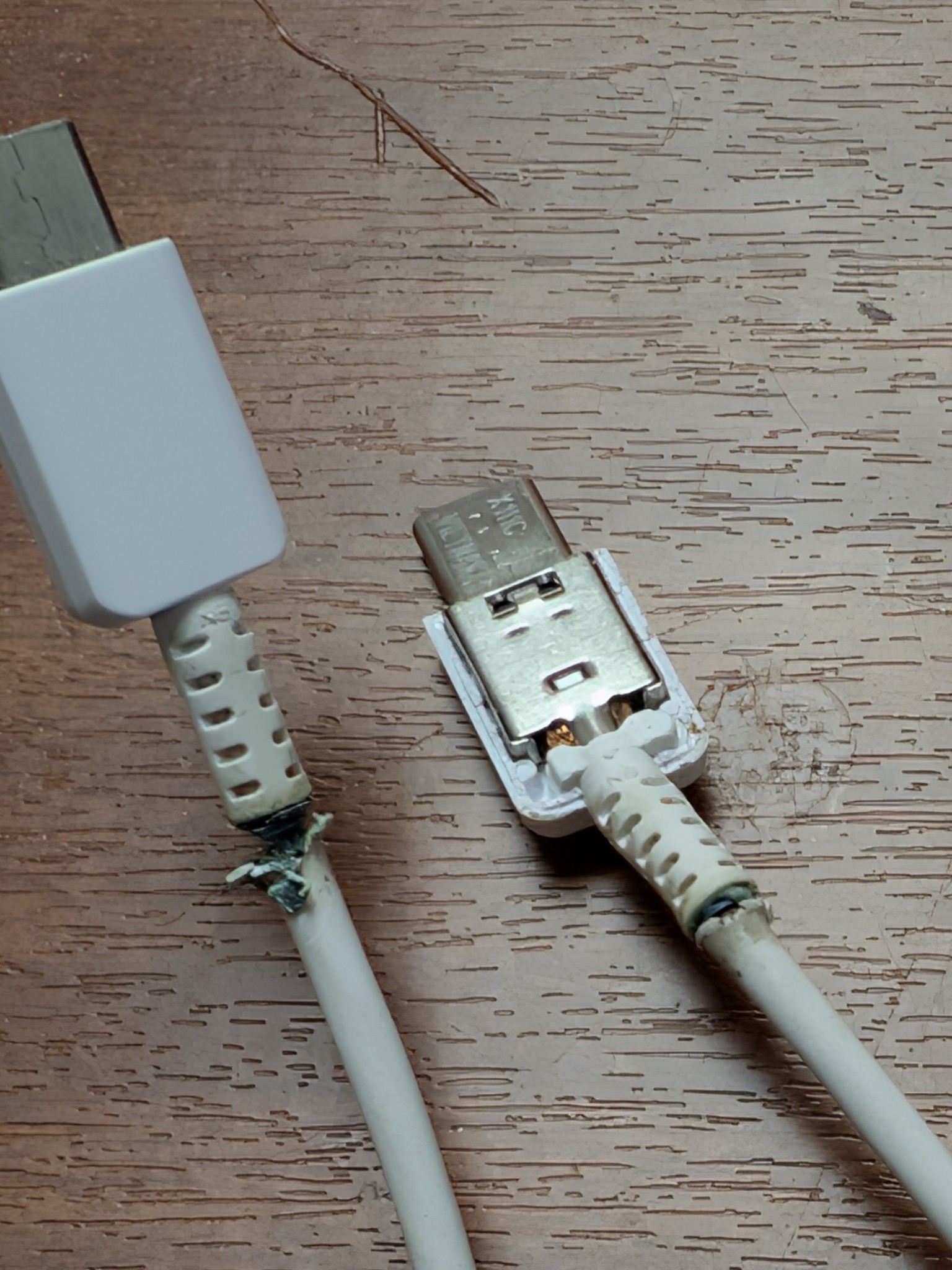
The True Cost of a Cheap iPhone Cable: Why It Matters and When to Bin the One You’ve Got | Mend My iPhone
Direct Answer: A cheap iPhone cable can damage your phone in three documented ways: by feeding it inconsistent voltage that degrades the battery, by fitting loosely and wearing out the charging port, and in rare cases by overheating to the point of fire. The savings are tiny (£10-15 against a £1000+ phone) and the risks are real. For iPhone 14 and earlier, look for MFi-certified cables. For iPhone 15, 16, 17 and the iPhone Air, look for USB-IF certified USB-C cables from reputable brands. Throw any cable away immediately if it’s frayed, bent, hot to touch, or showing internal wires.
Key Takeaways
- The £3 cable / £1000 phone paradox is a false economy — a £45 charging-port repair costs more than ten years of buying decent cables.
- MFi certification matters for Lightning cables (iPhone 14 and earlier). USB-IF certification matters for USB-C cables (iPhone 15 onwards). Apple changed the standard with iPhone 15 — most blog posts about cables haven’t caught up.
- Visual warning signs that demand instant binning: fraying, hot to touch, bent connector, burning smell, “this accessory may not be supported” message. Continuing to use a damaged cable is a fire risk.
The True Cost of a Cheap iPhone Cable
It’s the conversation I have with customers nearly every week. They’ve come in with a phone that won’t charge, or charges only at a particular angle, or runs out of battery faster than it used to. We open it up, run the diagnostic, and roughly half the time the actual fault isn’t the phone — it’s the cable they’ve been plugging into it.
The economics of this never quite make sense from the outside. People will spend £900-£1,400 on an iPhone, then immediately buy a £3 cable from a service station because the one in the box has worn out and they “just need something quick.” That £3 cable goes on to slowly damage the £1,400 phone. The customer doesn’t make the connection because it’s a slow process — months of borderline voltage, slight port wear, intermittent connection — and by the time the phone visibly fails, the original cable is long forgotten.
This post is about why that happens, what’s actually going on inside cheap cables, what to look for when buying, and when to bin the one you’ve got.
Why a £3 cable can hurt a £1,000 phone
A modern iPhone is engineered to fairly tight tolerances. The charging port expects a certain voltage range, a certain wattage limit, a certain physical fit, and a stable digital handshake with the cable’s authentication chip. Cheap cables fail on all four:
- Voltage instability. Quality cables contain regulator components that smooth out voltage spikes. Cheap cables often skip these. The iPhone’s battery management chip handles small fluctuations fine, but sustained borderline-spec voltage over months gradually accelerates battery degradation. Your battery health drops faster. The “deep discharge” failure mode that’s affecting iPhone 17s right now is partly compounded by cables that can’t deliver consistent power.
- Wattage throttling. Modern iPhones support fast charging — up to 20W on standard models, higher on Pro models. Cheap cables are often rated to only 5-10W. The phone will still charge but at a fraction of the speed, and the cable runs hotter doing it.
- Loose physical fit. The Lightning and USB-C ports on iPhones are precision components. Cheap cables often have slightly oversized or undersized connector pins. Each insertion wears the port a little. After a few hundred uses, the port is loose enough that the phone only charges when held at an angle. That’s a £45 charging-port repair that could have been avoided.
- Missing or counterfeit authentication chip. Lightning cables contain a small chip that handshakes with iOS. Cheap cables either skip it or use a counterfeit version. iOS sometimes warns about this with “this accessory may not be supported” — but plenty of cheap cables silently bypass the warning by using cloned chip IDs. The phone charges, but the safety negotiation that should be happening isn’t.
The Lightning / USB-C divide — what changed with iPhone 15
Most cable advice on the internet predates iPhone 15 and is now partly out of date. Here’s the current picture:
| iPhone model | Port type | Certification to look for |
|---|---|---|
| iPhone 5 to iPhone 14 (all variants) | Lightning | MFi certified — Apple’s licensing program for Lightning |
| iPhone 15, 16, 17, iPhone Air | USB-C | USB-IF certified with USB Power Delivery (USB-PD) support |
| iPad (varies by model) | Lightning or USB-C depending on year | MFi for Lightning, USB-IF for USB-C |
Apple originally hinted that USB-C iPhones would still require MFi-style certification. They didn’t. The USB-C port on iPhone 15 onwards is fully standard — any properly USB-IF-compliant USB-C cable works. This was a quiet win for consumers because it means you can use the same cable to charge an iPhone 15, a Samsung Galaxy, a Pixel, a MacBook, an iPad, an Android tablet, and probably your kettle eventually. The catch is that “USB-C” alone isn’t a quality marker — you still need to buy from a reputable brand to get a cable that’s actually built to spec.
What “MFi” actually means (for iPhone 14 and earlier)
MFi stands for “Made For iPhone / iPad / iPod.” It’s Apple’s certification programme. Manufacturers pay Apple a licensing fee, the cable is tested for safety and performance, and a small authentication chip is included that handshakes with iOS. When you see the MFi logo on packaging, it means:
- The cable has been tested by Apple’s specifications
- The voltage regulation has been verified
- The authentication chip is genuine
- The manufacturer is on Apple’s approved list
- iOS won’t throw “this accessory may not be supported” warnings
The catch: counterfeit MFi stickers are extremely common on marketplace sites. The only reliable way to ensure the certification is real is to buy from established brands (Apple themselves, Anker, Belkin, Native Union, Nomad, Mophie, Otterbox) or from reputable retailers (Apple Stores, John Lewis, Currys, etc.).
What “USB-IF” actually means (for iPhone 15+)
USB-IF is the USB Implementers Forum — the industry consortium that defines the USB standard. A USB-IF certified cable has been tested to comply with the USB-C and USB Power Delivery specifications. For iPhone 15 onwards, this is the certification that matters.
The detail to look for:
- USB-PD support for fast charging (so the cable can actually deliver 20W+ to your iPhone)
- E-marker chip for cables rated above 60W (iPhone-relevant for Pro models doing serious power delivery)
- USB 3.x or USB 2.0 data speed rating — only matters if you’re transferring data, but cheap cables often skip data lines entirely (charge-only)
- Reputable brand — same logic as MFi. Anker, Belkin, Apple’s own, Nomad, Native Union are reliable bets
The hidden costs nobody calculates
| What can go wrong | What it costs to fix |
|---|---|
| Charging port worn out by loose-fitting cheap cables | £45 port repair |
| Battery degraded by voltage fluctuations | £35-£89 battery replacement (model-dependent) |
| iPhone won’t fast-charge because cable is underpowered | Frustration + thinking your phone is faulty when it isn’t |
| Cable connector overheats and damages port | £45 port repair, plus potentially logic board |
| Cable shorts and causes fire (rare but documented) | Phone replacement + insurance claim + potential property damage |
| 10+ replacement cables over the phone’s life because cheap ones die fast | ~£40-60 in cumulative cable spend on cables that didn’t last |
Compared to which:
| What a good cable costs | How long it lasts |
|---|---|
| Apple’s own Lightning or USB-C cable: £19-29 | 2-3 years of daily use |
| Anker PowerLine III braided MFi/USB-C: £15-22 | 3-5 years |
| Native Union or Nomad braided premium: £25-35 | 4-6 years |
| Belkin Boost Charge MFi/USB-C: £15-20 | 2-4 years |
One £20 cable that lasts four years is roughly £5 per year. The customer who buys a £4 service-station cable every six months is spending £8 per year — for a worse experience and a higher risk of phone damage. The “expensive” option is actually the cheaper one.
When to bin a cable immediately — no exceptions
- Frayed or split outer insulation — internal wires can short against each other or against the phone
- Hot to touch when charging — heat means resistance, resistance means fire risk
- Smell of burning — unplug and bin immediately, do not continue using
- Visible internal wires — exposure to moisture or fingers makes this a serious safety risk
- Bent or wobbly connector — will damage your charging port with every use
- Cracked plastic on the connector housing — usually means internal stress damage
- “This accessory may not be supported” message — iOS is telling you something. Listen.
- Discoloration or blackening near the connectors — sign of overheating, even if you didn’t notice
- Phone charges intermittently or only at a specific angle — connector wear, the cable is on its way out
- Cable is more than 2-3 years old and being used daily — even good cables wear out eventually
What to look for when buying a new one
- Reputable brand. Apple, Anker, Belkin, Native Union, Nomad, Mophie. If you don’t recognise the brand, that’s a flag.
- Certification logo on packaging. MFi for Lightning, USB-IF for USB-C. The logo is a small mark, easy to miss — look for it specifically.
- Stated wattage rating. Look for at least 20W. For Pro models doing fast-charge, 30W+ is better.
- Braided exterior. Braided cables are dramatically more durable than plastic-coated ones. Worth the extra £3-5.
- Reinforced strain relief. The bit where the cable meets the connector is where 90% of cable deaths happen. Better cables have visible reinforcement.
- Reasonable price. £15-25 is the sensible range. Below £8 is suspicious. Above £40 is generally unnecessary unless you specifically need a long premium cable.
- Buy from a real shop or reputable online retailer. Avoid marketplace listings under £5 — they’re frequently counterfeit.
Quick recommendation if you don’t want to think about it:
For Lightning (iPhone 14 and earlier): Apple’s own cable, or Anker PowerLine III MFi.
For USB-C (iPhone 15+): Apple’s own USB-C cable, Anker 240W USB-C, or Nomad Sport USB-C.
Spend £20. Buy a good one. Replace it every 2-3 years. Don’t think about it again.
Why this matters more right now
The iPhone 17 series has a known firmware issue (covered in our recent post) where phones that hit 0% sometimes fail to wake up over wired charging. The workaround is MagSafe wireless charging. But part of what makes the wired-charging failure worse is borderline cables — a cable that delivers oscillating wattage rather than stable power makes the dead-battery wake-up problem significantly harder.
If you’ve had any “my iPhone won’t charge” experience this year, the first thing worth checking before booking a repair is: what cable were you using? About 70% of the “won’t charge” calls we get turn out to be cable issues, port lint, or both — neither of which require a paid repair.
If your phone or port is already affected
If you’ve been using a cheap cable and now your phone is showing signs of damage — slow charging, intermittent connection, charging port that’s loose, “this accessory may not be supported” warnings even with a new cable — Mend My iPhone offers a free diagnostic at the shop in Market Weighton or by callout across East Yorkshire.
If it’s a port issue, we usually clean it for free first (pocket lint accounts for around 70% of charging port problems). If a port replacement is genuinely needed, that’s £45. If it’s a battery issue from sustained voltage damage, we can replace that too. Either way, you’ll get an honest diagnosis and a fixed quote before any work begins.
Frequently Asked Questions
Can a cheap iPhone cable really damage my phone?
Yes. Cheap, uncertified cables can damage iPhones in three documented ways: voltage fluctuations that degrade the battery over time, loose-fitting connectors that wear out the charging port, and overheating that can short-circuit internal components or — in rare cases — cause fires. Apple’s own safety documentation and an ABC News / Good Morning America investigation have both confirmed these risks.
Do I need an MFi-certified cable for my iPhone?
For iPhone 14 and earlier (Lightning port): yes, MFi is what you should look for. For iPhone 15, 16, 17 and the iPhone Air (USB-C port): MFi is no longer the relevant standard — USB-IF certification and USB Power Delivery compliance are. Standard USB-C cables work fine with iPhone 15+ as long as they’re from a reputable brand.
How can I tell if my iPhone cable is genuine MFi?
Look for the official MFi logo on the packaging, buy from reputable brands (Apple, Anker, Belkin, Native Union, Nomad), and avoid suspiciously cheap cables on marketplace sites. Counterfeit MFi stickers are common. iOS will sometimes display “this accessory may not be supported” on uncertified or counterfeit cables — that warning is meaningful.
When should I throw an iPhone cable away?
Throw the cable away immediately if: the outer insulation is frayed or split, the connector is bent or wobbly, the cable feels hot to touch when charging, you smell burning, internal wires are visible, the connector housing is cracked, or the phone shows “this accessory may not be supported.” Continuing to use a damaged cable risks port damage, battery damage, and in extreme cases fire.
Why is my iPhone charging slowly?
Slow charging is most often caused by an underpowered cable, an underpowered wall adapter, or a dirty charging port. iPhones support fast charging up to 20W on most models and higher on Pro models — but only with a cable rated to handle that wattage. Many cheap cables are rated for low wattage (5-10W) only and silently throttle the charge speed.
What’s the difference between USB-IF and MFi certification?
MFi (Made For iPhone) is Apple’s licensing program for Lightning cables and accessories. USB-IF (USB Implementers Forum) is the open industry standard that USB-C cables follow. Since iPhone 15, Apple uses standard USB-C and no longer requires MFi for cables — but USB-IF compliance still matters for fast charging and reliable data transfer.
How long should an iPhone cable last?
A good-quality cable used carefully should last 2-3 years of daily use. Apple’s own cables and reputable third-party MFi cables typically last 18-36 months. Cheap unbraided cables often fail within 6-12 months. Braided cables (Anker PowerLine, Native Union, Nomad) are significantly more durable and can last 3-5 years.
What should I buy instead of cheap cables?
Reputable brands worth the money: Apple’s own cables (most reliable but most expensive), Anker (excellent value, good warranty), Belkin (solid mid-range), Nomad (premium braided cables built to last), Native Union (premium with style). Expect to spend £15-25 for a good cable. Anything under £8 from an unknown brand is the category to avoid.
Sources
Cable safety risks and counterfeit MFi prevalence are documented by Apple’s own iPhone safety guidance, an ABC News / Good Morning America investigation into cheap Lightning cables, MacRumors and AppleInsider reporting on USB-C cable certification standards for iPhone 15 onwards, and ongoing repair-industry reporting on the link between cheap cables and charging port damage.
Get help if you need it
If you’ve been using a cable that should probably have been binned by now, and your iPhone is starting to charge slowly, intermittently, or only at an angle — bring it into Mend My iPhone in Market Weighton, or book a callout to your home or workplace across East Yorkshire. Free diagnostic. Free port clean if that’s all it needs. Honest quote if more work is required. Twelve-month warranty on every repair.
Leave a Reply