
Nintendo Switch Charging Repair Market Weighton | M92T36 Chip & Port Fault Finding | 12-Month Warranty — Mend My iPhone
Direct Answer: A Nintendo Switch that won’t charge or power on usually has a failed USB-C charge port or, just as often, a failed M92T36 charging chip — the part that manages USB-C power behind the port. At Mend My iPhone in Market Weighton I trace and replace both at board level, restoring charging and power.
Key Takeaways
- A Switch that won’t charge isn’t always the port — the M92T36 power chip behind it fails just as often, especially after a cheap charger or a third-party dock.
- Fitting a new port won’t fix anything if the chip behind it has shorted; board-level fault finding is what tells the two apart and finds the real cause.
- Charge port and M92T36 faults are repairable across Switch, Switch Lite and Switch OLED, with a 12-month warranty and UK-wide mail-in.
Inside a Charge Port and M92T36 Repair
This Switch came in completely unresponsive. Dead on mains, dead off it, no charging light, no logo, nothing. The owner had been told it was finished. It wasn’t — but the fault was a textbook example of why “just replace the charge port” is often only half the job, and why the part that actually kills these things hides one step deeper than most people look.
Here is how the repair went, in plain English, with enough of the real method left in that anyone in the trade will recognise it.
The obvious suspect: the USB-C charge port
On a Switch that won’t charge, the charge port is always the first place you look. It is a USB-C connector that takes a lot of plugging, unplugging and docking over the years, and the solder joints that hold it to the board can fatigue and crack. So the port goes under the microscope first.
This is where it got interesting. The port itself was fine. The connector was sound, the joints were good, mechanically it was fitted perfectly. By the “swap the port and move on” playbook, there was nothing to do. But the console was still dead — so the port being fine wasn’t the end of the story. It was a clue.
Why a “perfectly fine” port was the giveaway
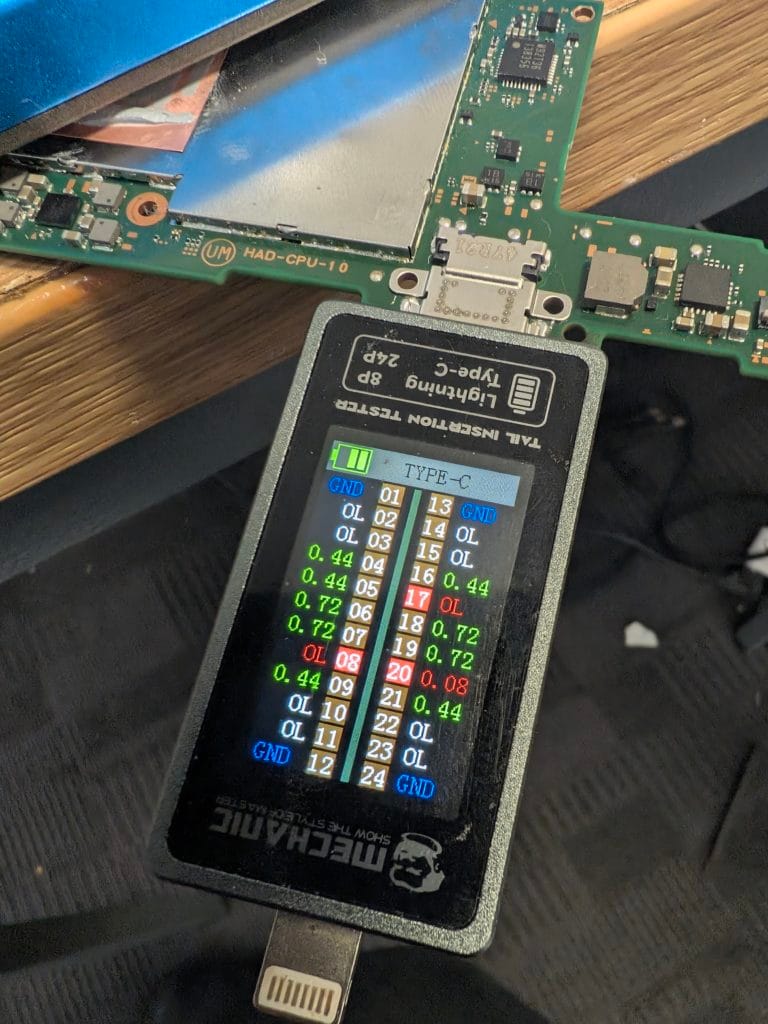
When you test a charge port properly, you don’t just look at it — you check that each of its lines actually carries through into the board. Power and signals come in at the connector, but they have to travel onward to do anything. So you measure for continuity from the port into the circuit behind it.
Several of those lines read open — meaning the connection was broken somewhere past the port. The bridge was out, even though the port at the near end was perfect. Think of it like a perfectly good front door opening onto a hallway where the floor has collapsed. The door isn’t the problem. Whatever the door leads to is. Open lines on a well-fitted port point you straight past the connector and onto the board itself.
Behind the port: the M92T36, the Switch’s famous weak spot
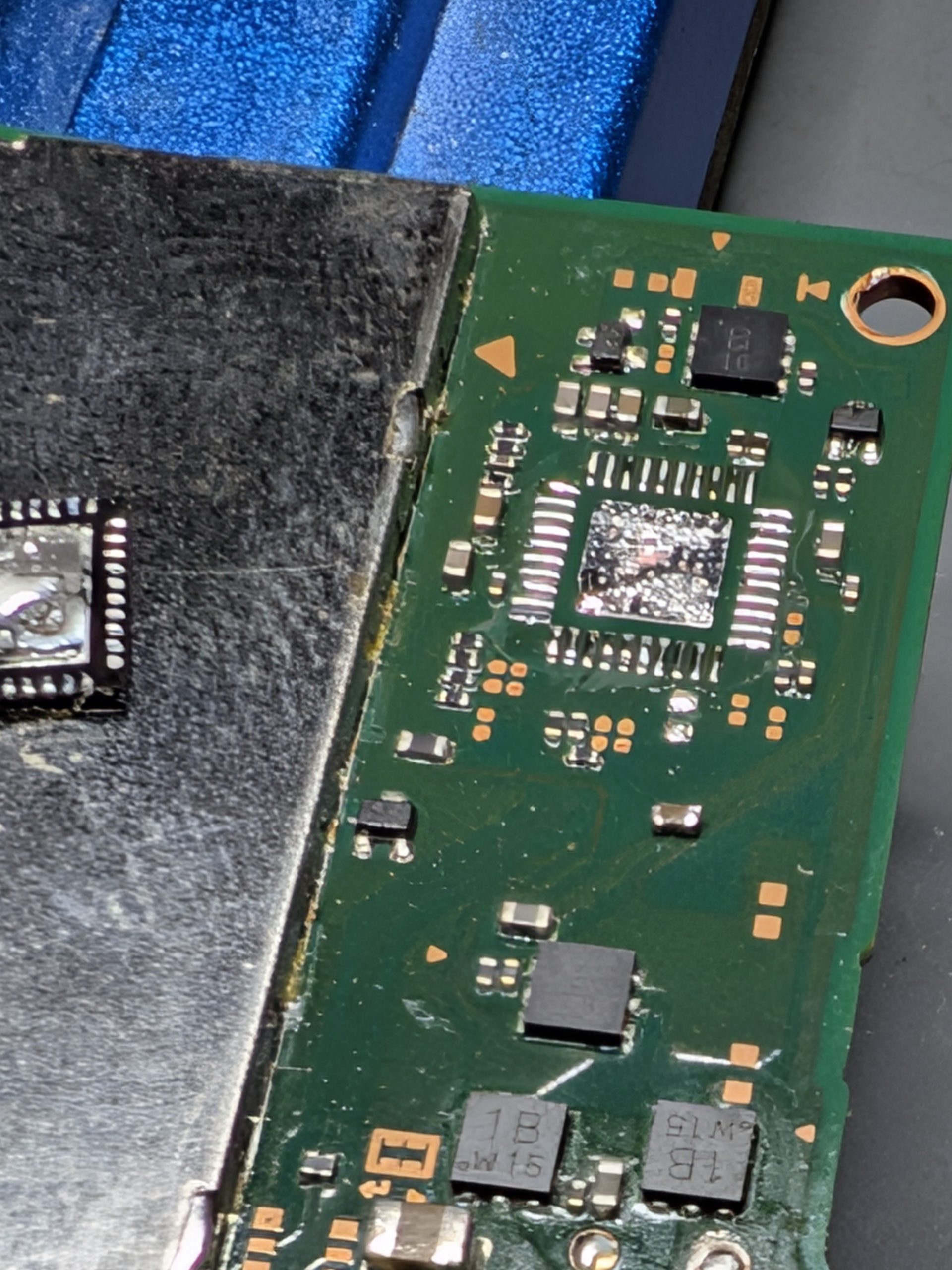
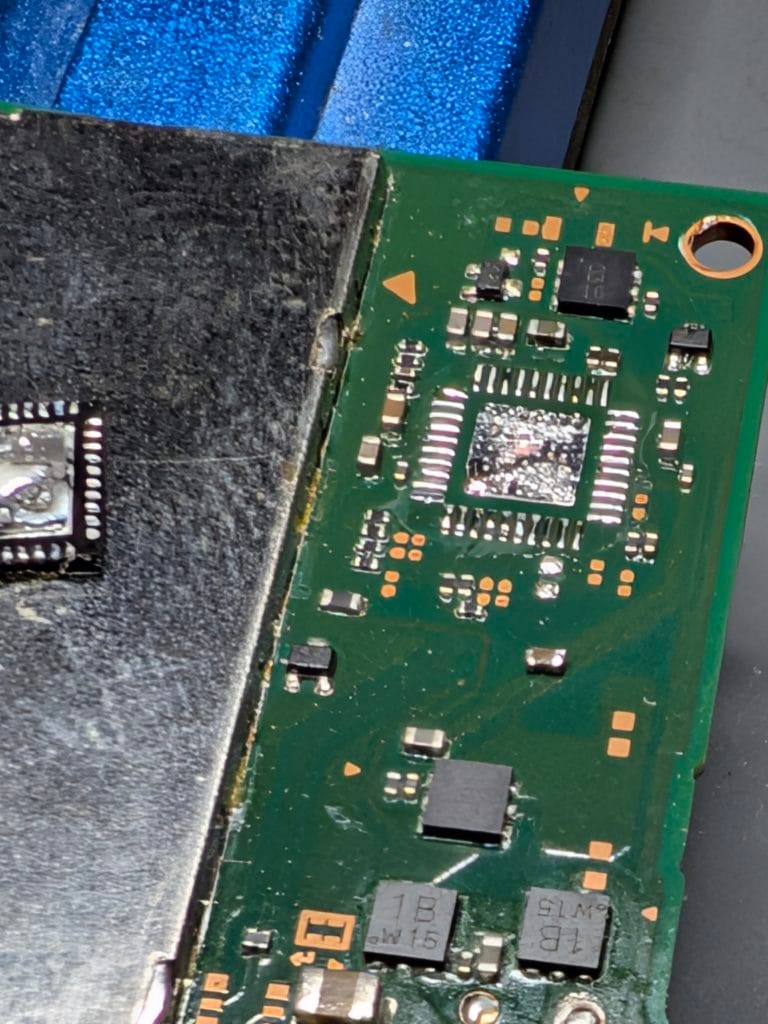
Just behind the charge port sits a small chip called the M92T36. It is the brain of the Switch’s USB-C charging — it negotiates with the charger over the USB-C standard, decides how much power to draw, and routes that power and the port’s signals onward into the rest of the console. Nearly everything that comes in through the port passes through this chip.
It is also one of the most failure-prone parts on the entire console, and the reason is usually preventable: cheap, non-compliant chargers and budget third-party docks. USB-C charging relies on both ends following strict rules about voltage. A dock or charger that ignores those rules can push the wrong voltage into the Switch and overstress the M92T36 until it gives up. When it dies, it often shorts internally — and because it sits between the port and the board, a shorted M92T36 is exactly what makes those port lines read open. Suddenly the whole picture fits: no charging, no power, perfect port, dead lines. The chip was the break in the chain.
Investigating around the chip confirmed it. There were shorts where there should not have been, and the M92T36 had failed. That is the real fault, and no number of replacement charge ports would ever have fixed it.
The fix: replacing the chip
Replacing an M92T36 is microsoldering, not a parts swap you can do with a screwdriver. The failed chip comes off under the microscope with hot air, the pads underneath are cleaned and prepped, and a new chip goes on in its place, lined up precisely. Then the lines that were reading open get re-tested to confirm power and signal now travel through to the board as they should.
With the new chip on, the open lines closed up, the shorts were gone, and the console finally had a clear path for power. Plug it in, and a charging light. Press the button, and it booted. A Switch that arrived as a paperweight, charging and powering on again — over a chip the size of a fingernail.
What a Switch that won’t charge is usually telling you
Charging faults follow patterns. Here is a quick guide to what the common symptoms tend to mean, and whether they are the sort of thing I fix at board level.
| Symptom | What it usually means | Board-level fixable? |
|---|---|---|
| No charging light, won’t power on at all | Failed M92T36 charging chip, or a power rail short | Yes, usually |
| Only charges at a certain angle or with a wiggle | Worn or cracked USB-C charge port | Yes, port replacement |
| Charged fine until a cheap charger or dock was used | M92T36 overstressed and shorted — the classic failure | Yes |
| Shows a charging light but won’t switch on | Battery, the BQ charging IC, or a power rail fault | Often |
| Stopped after liquid got in | Corrosion across the port and chip area | Often, with proper cleaning |
The lesson worth passing on: mind what you plug in
If there is one takeaway for any Switch owner, it is this. The single best thing you can do to avoid this repair is to stop feeding it cheap chargers and unbranded docks. The few quid you save on a knock-off charger is exactly the few quid that ends up costing you a chip replacement down the line. Use a genuine charger, or a properly certified one, and treat the dock with the same caution.
The same board-level approach that saved this Switch is what I bring to every dead devices like Xbox repairs and it is built on a habit of fault finding and diagnostics at board level that goes back further than most repair shops have existed. The trickier laptop and PC’s get the same treatment. Twelve years in, a 4.9-star rating, a proper 12-month warranty, and a Border Collie called Jen keeping an eye on things. We fix what others can’t.
Frequently Asked Questions
Why won’t my Nintendo Switch charge or power on?
The two usual culprits are the USB-C charge port and the M92T36 charging chip behind it. The port can wear out or break its connection to the board, and the M92T36, which manages USB-C power, fails often, especially after a cheap charger or a dodgy dock. Either fault stops charging and can stop the console powering on entirely. Both are board-level repairs.
What is the M92T36 chip and why does it fail?
The M92T36 is the small chip that controls USB-C power and charging on the Switch — it negotiates with the charger and routes power and signals from the port into the rest of the console. It sits right behind the charge port and is a known weak point. A non-compliant charger, a third-party dock or a knock to the port can short it out, which kills charging and often power too.
I replaced the charge port and it still won’t charge. Why?
Because the port is only half the story. If the M92T36 chip behind it has failed, a brand-new port still has nothing to connect to. This is exactly what I see most often: a perfectly fitted port with dead lines, because the real fault is the chip deeper on the board. You have to test past the port to find it.
Can a cheap charger or third-party dock really kill a Switch?
Yes, and it is one of the most common ways the M92T36 dies. Non-compliant chargers and budget docks that do not follow the USB-C power rules can push the wrong voltages and overstress the chip. A genuine Nintendo charger or a properly certified one is cheaper than the repair it saves you.
Do you repair Switch, Switch Lite and Switch OLED?
Yes, all three. The charge port and charging-chip faults appear across the whole Switch family, and the board-level method to find and fix them is the same. Tell me which model you have and what it is doing and I will take it from there.
Is it worth repairing a Switch that won’t charge, or should I buy a new one?
In most cases repair wins comfortably. A charge port or M92T36 fault is a board-level fix on parts that cost a fraction of a new console, and your saves and account stay on your own machine. Replacing the whole Switch over a small chip is exactly the throwaway thinking I am here to push back against.
Can I post my Switch in for repair?
Yes. I run a UK-wide mail-in service alongside walk-ins at the Market Weighton shop, and every repair carries a 12-month warranty. Email james@mendmyiphone.co.uk or message 0330 999 2949 and I will tell you how to send it in safely.
Switch won’t charge? Get it looked at before you replace it
If your Nintendo Switch, Switch Lite or Switch OLED won’t charge or won’t turn on, there is a strong chance it is one charge port or one M92T36 chip away from working again. I do board level repair across a lot of devices from the shop at 9 Southgate, Market Weighton, with walk-ins welcome and a UK-wide mail-in service if you are further out. Email info@mendmyiphone.co.uk or message 079340629489, tell me the model and what it is doing, and I will tell you honestly whether it is worth saving. Usually, it is.
Leave a Reply