
Quick Fix iOS26
𝗜𝗳 𝘆𝗼𝘂 𝗵𝗮𝘃𝗲 𝗮𝗻 𝗶𝗣𝗵𝗼𝗻𝗲 𝗬𝗢𝗨 𝗡𝗘𝗘𝗗 𝘁𝗼 𝗸𝗻𝗼𝘄 𝘁𝗵𝗶𝘀.
Save the photo to help..here’s why.
iPhones have faults – they glitch – commonly these things happen and if you read to the end you can 𝗳𝗶𝘅 𝘁𝗵𝗲𝗺 𝘆𝗼𝘂𝗿𝘀𝗲𝗹𝗳 𝗲𝗮𝘀𝗶𝗹𝘆 𝗶𝗻 𝟭𝟱 𝘀𝗲𝗰𝗼𝗻𝗱𝘀 or less and if you come to my shop it’s all I will do.
Faults:
Black Screen
Unresponsive Screen
No Signal (more detailed help here if this fix doesn’t help)
Not charging but cable fits perfectly
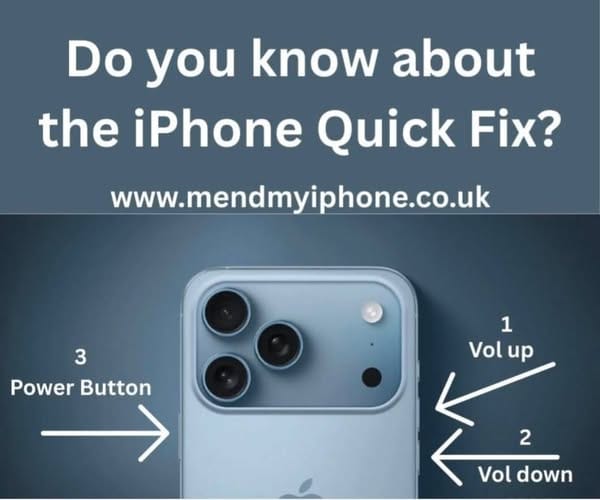
Do this
Press the power button to dim the scrreen (unless it’s already dim)
Press 𝗩𝗼𝗹𝘂𝗺𝗲 𝗨𝗽 once
Pres 𝗩𝗼𝗹𝘂𝗺𝗲 𝗗𝗼𝘄𝗻 Once
Press and Hold the 𝗣𝗼𝘄𝗲𝗿 𝗕𝘂𝘁𝘁𝗼𝗻 (keep holding and do not swipe to turn off) and keep holding for 12-15 seconds and when you see the Apple logo re-appear let go.
Your phone should now work.
If it doesn’t try it again making sure you press the Vol up and Vol down quickly in succession and properly.
We do this at least once a day for iPhone users – it’s a quick fix and it’ll save you driving half an hour to me to have me do it for you.

- Common iPhone Faults by Model: Repair & Buy Guide (2026)
- Where to Sell Your Old Phone in the UK: CeX vs eBay vs Facebook Marketplace
- Worst iPhones to Buy Second-Hand in 2026
- Best Second-Hand iPads to Buy in 2026 by Budget | UK Guide
- Where to buy the Best Used iPhones to Buy in 2026: Top Picks Under £50, £100, £150 & £200

thank you
I very delighted to find this internet site on bing, just what I was searching for as well saved to…
thank you
thank you
thank you


Leave a Reply