
After ten years of fixing phones in Market Weighton, I’ve noticed something. A lot of the people who walk through the door don’t actually need a repair. What they need is someone to tell them to clean the charging port with a toothpick, or flick the silent switch, or try a force restart. Simple stuff — but stuff nobody ever told them.
So I built a tool to tell them before they come in.
It’s free, it’s on the website right now, and it covers every major fault type on iPhone, Samsung and iPad. Here’s what it does and why I think it’s the most useful thing on this site.
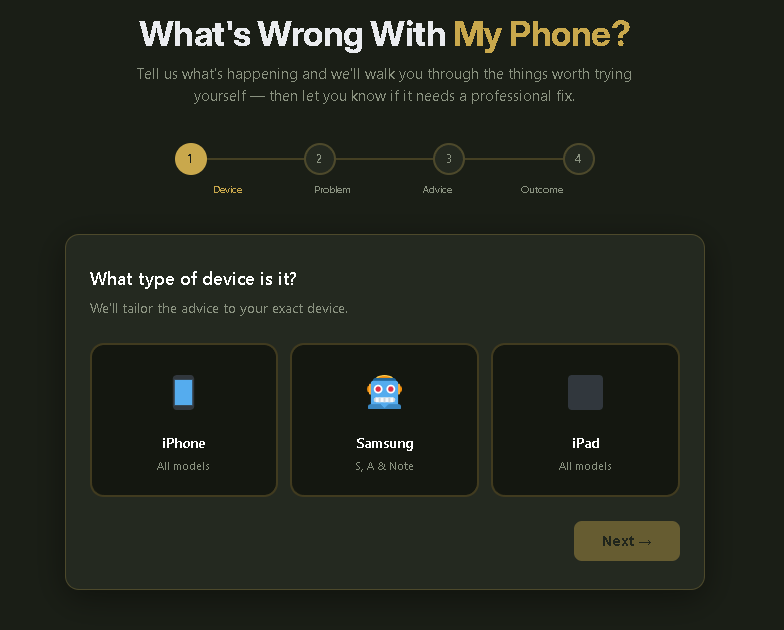
What Is the “What’s Wrong With My Phone?” Tool?
It’s a free interactive diagnostic that walks you through your phone problem step by step. You pick your device (iPhone, Samsung or iPad), choose from ten common faults, and it gives you a personalised, step-by-step self-help guide tailored to your exact situation.
If the steps fix it — brilliant. You’ve saved yourself money and a trip.
If they don’t fix it, it tells you what the repair is called, what’s likely involved, and gives you a direct WhatsApp link to book with a message already written for you — including the fault description, so I know what I’m looking at before you’ve even arrived.
It covers:
- Cracked screen
- Glitchy or black screen
- Won’t charge
- Battery draining fast
- No signal or SIM issues
- Won’t turn on
- Water damage
- Camera problems
- Speaker or sound issues
- Running slow or crashing
Why Give Free Advice Away?
Fair question. The honest answer is: because it’s the right thing to do, and because it builds trust faster than any advert ever could.
If your phone won’t charge and it turns out to be a ball of pocket fluff in the port — I’d rather you found that out in two minutes at home than drive to Market Weighton, wait for me to poke it with a tool, and feel a bit silly. That’s not a good experience for anyone.
On the other hand, if you’ve worked through everything the tool suggests and it’s still broken, you’re coming to me knowing exactly what’s wrong, I know what parts I’ll need, and we can often sort it same-day. Everyone wins.
After 10 years and 400+ five-star reviews, I know that the people who trust me the most are the ones I’ve been genuinely useful to — not just the ones I’ve taken money from.
What the Tool Actually Tells You
Here are the kinds of things the tool covers — because this is useful whether you use the tool or not.
The Most Common Reason an iPhone Won’t Charge Is Fluff in the Port
This is responsible for more “my charging port’s broken” panic than anything else. Phones spend their lives in pockets and bags. Fluff compacts into the Lightning or USB-C port over months until the cable can barely make contact. Use a wooden or plastic toothpick (never metal), shine a torch in the port, and gently hook the debris out from the sides. It fixes the problem the majority of the time. If you bring it in and that’s the issue, I’ll clean it for free.
A Force Restart Fixes More Things Than You’d Think
If your iPhone screen is glitching, black, frozen or the phone won’t respond — try a force restart before you do anything else. On iPhone 8 and newer: press Volume Up, then Volume Down, then hold the Side button until the Apple logo appears. On Samsung: hold Volume Down and Power together for 10 seconds. This clears software crashes without deleting anything. It costs nothing and fixes a genuinely surprising number of faults.
Don’t Put a Water-Damaged Phone in Rice
Rice does not fix water damage. It absorbs moisture from the air around the phone, not from inside it — and it wastes the critical window when professional treatment can actually help. The right move is to turn the phone off immediately, remove the SIM, and bring it in as fast as you can. Don’t charge it, don’t use a hairdryer, and don’t leave it for 24 hours “to dry out.” Every minute matters with water damage.
No Signal Is Often a Software Problem
If your phone has suddenly lost signal, toggle Airplane Mode on and off, restart the phone, and try removing and reinserting your SIM. If that doesn’t work: Settings → General → Reset → Reset Network Settings (iPhone) clears corrupted carrier data and fixes this in a high proportion of cases — especially if the problem appeared after a software update. It removes saved Wi-Fi passwords but that’s the only trade-off.
A Dying Battery Makes Your Phone Slow — Not Just Short-Lived
On iPhone, go to Settings → Battery → Battery Health. If it’s below 80%, Apple is deliberately throttling your phone’s performance to prevent unexpected shutdowns. People come in thinking their iPhone is dying when actually it just needs a battery replacement. Same-day job, 12-month guarantee, and the phone feels like new.
When You DO Need to Come In
The tool is honest with you. Some problems can’t be fixed at home:
Cracked screen — there’s no self-help for broken glass. The tool tells you that straight away and explains why leaving it makes it worse (cracks spread, moisture gets in, sharp edges are a hazard).
Water damage — the tool gives you the immediate steps to take (and the things not to do), then tells you to get in as fast as possible. We offer a free assessment with no fix, no fee.
Persistent hardware faults — if you’ve worked through all the self-help steps and nothing’s changed, the tool identifies the most likely repair type and sends a pre-written WhatsApp message to get the process started.
Try It Now
→ What’s Wrong With My Phone? — Free Diagnosis Tool
Takes about 30 seconds. No sign-up, no email address, nothing to install. Just pick your device, pick your problem, and get actual useful advice.
If it fixes your phone — you’re welcome.
If it doesn’t — you know where I am.
Mend My iPhone, Market Weighton, East Yorkshire Open 7 days · Same-day repairs · Free parking · 4.9 stars · 12-month guarantee 📞 07934 062949 · 💬 WhatsApp
What’s wrong with my phone if it won’t turn on?
The most common reasons a phone won’t turn on are a completely flat battery, a software crash, or a failed charging cable. Plug it in using the original cable and leave it for 30 minutes without touching it — even if the screen stays black, it may be charging. After 30 minutes, try a force restart: on iPhone 8+, press Volume Up → Volume Down → hold Side button. On Samsung, hold Volume Down and Power for 10 seconds. If it still won’t respond, try a different cable and charger. If none of that works, it needs a professional diagnostic.
Why is my phone battery draining so fast?
Fast battery drain is usually caused by one of three things: a worn-out battery (check Settings → Battery → Battery Health on iPhone — below 80% means replacement time), a rogue app running in the background (check battery usage by app in Settings → Battery), or 5G being active in a weak coverage area. Start by checking battery health, then check which app is using the most power, and switch to 4G if you’re in a patchy 5G area.
How do I fix a glitchy or unresponsive phone screen?
Start with a force restart — this fixes the majority of screen glitches and unresponsive displays caused by software crashes. On iPhone 8 and newer: Volume Up → Volume Down → hold Side button. On Samsung: hold Volume Down + Power for 10 seconds. If the screen is still flickering after a force restart and a full charge, the display hardware is likely faulty and needs professional repair.
Why won’t my iPhone or Samsung charge?
The most common cause is compacted lint in the charging port — shine a torch in and look for debris, then gently clear it with a wooden toothpick. After that, try a different cable (cables fail far more often than ports) and a different wall adapter. If it charges wirelessly but not with a cable, the port itself needs replacing. If nothing charges it, the battery may have failed completely.
What should I do if my phone gets wet?
Turn it off immediately — do not try to use it or charge it. Do not put it in rice (this is a myth and wastes valuable time). Remove the SIM card and case, and bring it in as soon as possible. Water damage recovery rates drop significantly over time. At Mend My iPhone in Market Weighton, we offer a free water damage assessment with no fix, no fee.
Why has my phone lost signal?
Toggle Airplane Mode on and off, then restart the phone. Remove your SIM, wipe it with a dry cloth, and reinsert it firmly. Try your SIM in another phone — if it works there, the problem is your handset; if not, contact your network provider. On iPhone: Settings → General → Transfer or Reset iPhone → Reset → Reset Network Settings often fixes persistent signal issues, especially after software updates.
How do I force restart an iPhone?
On iPhone 8 and newer (including all current models): quickly press Volume Up, then quickly press Volume Down, then hold the Side button until the Apple logo appears. On iPhone 7 or 7 Plus: hold Volume Down and the Sleep/Wake button together for 10 seconds. On iPhone 6s or earlier: hold the Home button and Sleep/Wake button together for 10 seconds. A force restart clears software crashes without deleting any data.
Is it worth repairing a phone or should I replace it?
As a general rule, if the repair costs less than a third of what the phone is worth secondhand, repair is almost always the right choice. We also have a free Repair Cost Estimator on the site that gives you a verdict based on your exact model and fault type. Most repairs — screen, battery, charging port — are significantly cheaper than replacing the device and come with a 12-month guarantee.
Mend My iPhone is a one-person independent phone repair shop based in Market Weighton, East Yorkshire. 10+ years experience, 400+ five-star reviews, same-day repairs, and a 12-month guarantee on all work. Serving Market Weighton, Beverley, South Cave, York, Hull, Pocklington, Driffield, Howden, Brough and the wider East Riding.
Leave a Reply